
What platform do challenges run on?
Match-Trader, with TradingView-style charting. Trade it in your browser with nothing to install, or on your phone in the Match-Trader app.
Simulated prop trading · Open worldwide, US includedFrom the team behind LHFX
Platform
In your browser with nothing to install, or on your phone in the Match-Trader app. TradingView-style charting, and no platform password to keep track of. Every Stampede account is a simulated evaluation or funded account, priced live on the Match-Trader engine.
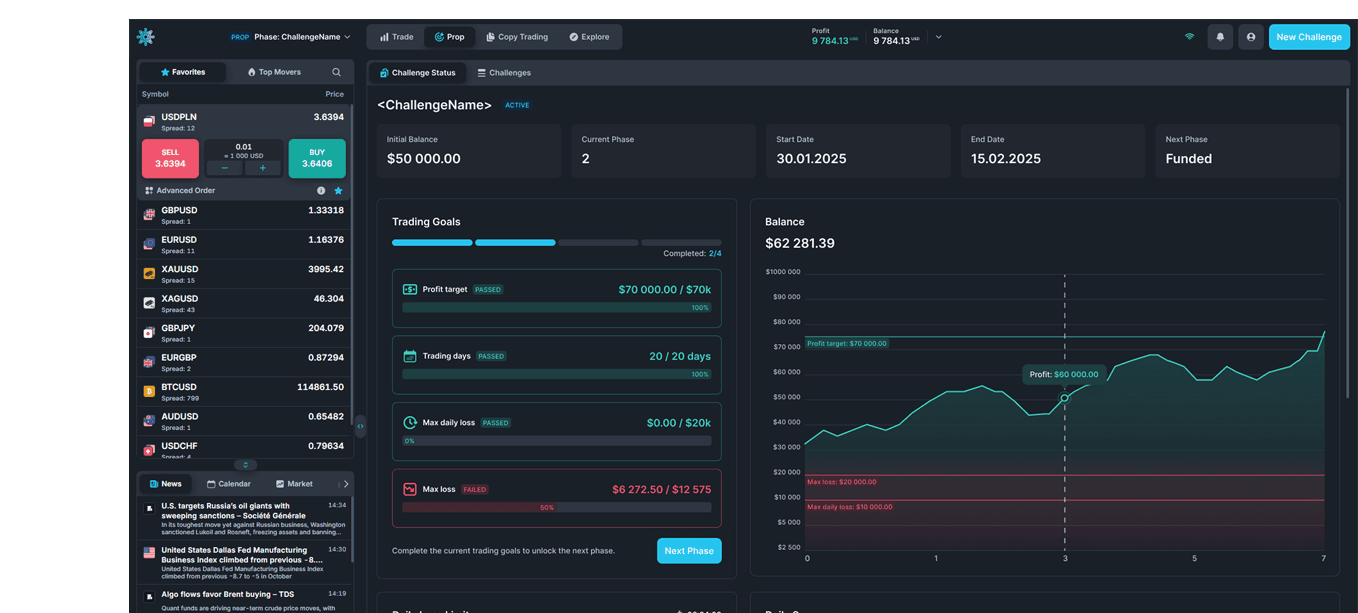
Sign in to your dashboard and press Trade. No platform login, no password, no server name: the button opens the platform in a new tab with you already signed in.
That is the whole handover on desktop. Nothing to lose, mistype or reset, and nothing to set up again on a different machine.
Prefer your phone? The Match-Trader mobile app trades the same account. You sign in there with your email.
Match-Trader gives you the charting and the order tools without a setup step: open a browser on whatever machine you are sitting at, or the app on your phone, and your account is there. One workspace to learn once and keep, through the evaluation and after you are funded.
Match-Trader is the platform every Stampede plan trades on. If your workflow depends on a different one, that is worth knowing before you buy rather than after.
Final instrument list and leverage matrix publish with the platform contract.
FX majors and minors, gold and metals, indices, oil, crypto, on every plan, on one account. 1:30 on FX, scaled down by asset class, and the same on evaluation and funded. Most US-welcome firms hand you crypto only or futures only; this is the full range the team already runs at its brokerage.
Automation
Automated trading is welcome on every plan, at no extra fee. Point your own bot or EA at the Match-Trader API and it trades your account the same way your hand would.
You can also connect an AI assistant, which is rare among prop firms. The Stampede connector is a hosted endpoint that links Claude, ChatGPT, or any app that supports remote MCP connectors to your account. The AI can read your balances, positions, drawdown room, and rule status, and place or close trades on your own account. See how to connect an AI to your account.
You authorize it with your Stampede login, and you can revoke it any time from your dashboard. It sits on top of the platform, so nothing you already do changes.
The rules do not change when a machine trades. The same published limits apply to a bot and an AI as to your own hand, and they are checked as you trade, never decided by a reviewer after you pass. The full list, and how to keep automation inside it, is on the EA and automation and rules pages.
Match-Trader, with TradingView-style charting. Trade it in your browser with nothing to install, or on your phone in the Match-Trader app.
Yes. Automated trading is allowed on every plan at no extra fee. Point your own bot or EA at the Match-Trader API, or connect an AI assistant such as Claude or ChatGPT, or any app that supports remote MCP connectors, through the Stampede connector. You authorize it with your Stampede login and can revoke it any time from your dashboard. Whatever places the trade, the same published rules apply and are checked as you trade, not decided by a reviewer at payout.
On desktop you do not need one. Nothing is emailed to you to type in: no login, no password, no server name. You sign in to your Stampede dashboard and press Trade, and the platform opens in a new tab with you already signed in. To use the mobile app, sign in there with your email.
Yes. The Match-Trader mobile app trades the same account as the browser, so your evaluation or funded account is the same account either way. Sign in to the app with your email.
Not today. Stampede runs Match-Trader, and that is the platform every plan trades on. If your workflow depends on MetaTrader, it is worth knowing before you buy rather than after.
No. The evaluation and the funded account run on the same platform, reached the same way. Passing does not mean relearning your workspace.
Pay the one-time fee from $39, then press Trade. The most you can ever lose is the fee.